
AI cost estimation for construction
Drawings in,
Priced SoW out
Xtimo reads and understands the drawings, generates the Schedule of Work, and then prices it. You can add an existing SoW for Xtimo to fill in.
Only have drawings? Xtimo reads them and generates the SoW for you.
14-day trial, 75 free credits. Card required, not charged until day 15. Cancel anytime before then.
Our clients
Built for architects, quantity surveyors and contractors in the UK
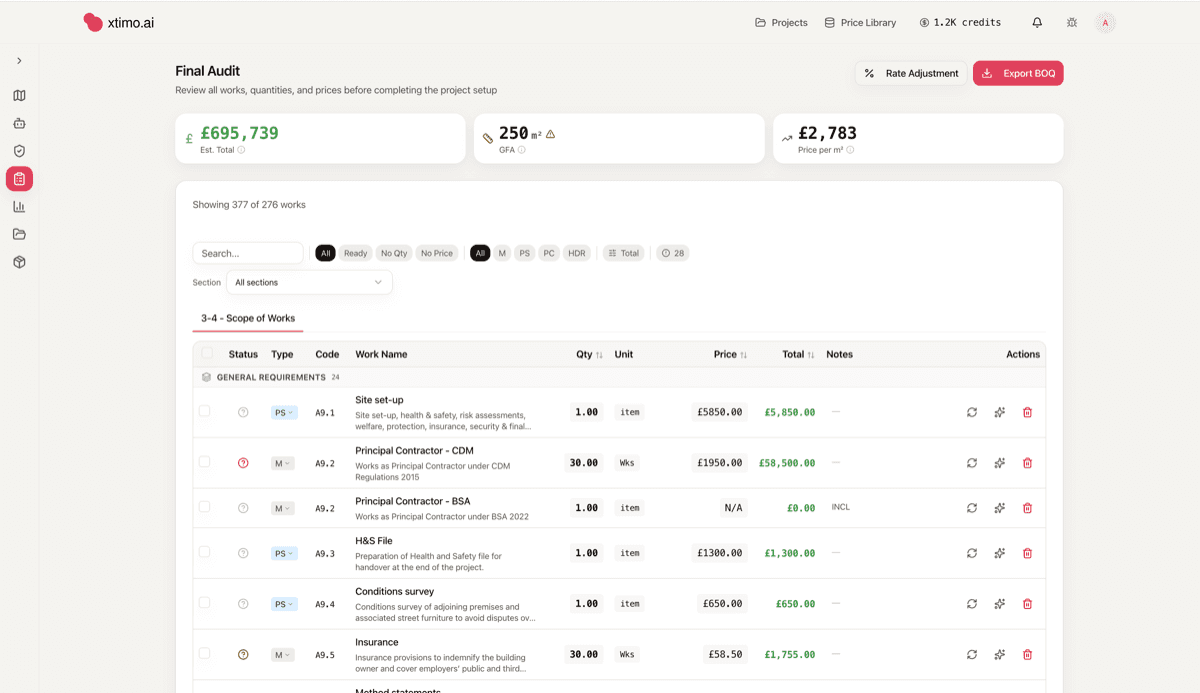
From drawings and SoW to a fully priced estimate, where items to review are clearly flagged to speed up the process.



From drawings to a project estimate
Watch a project become a priced Schedule of Work
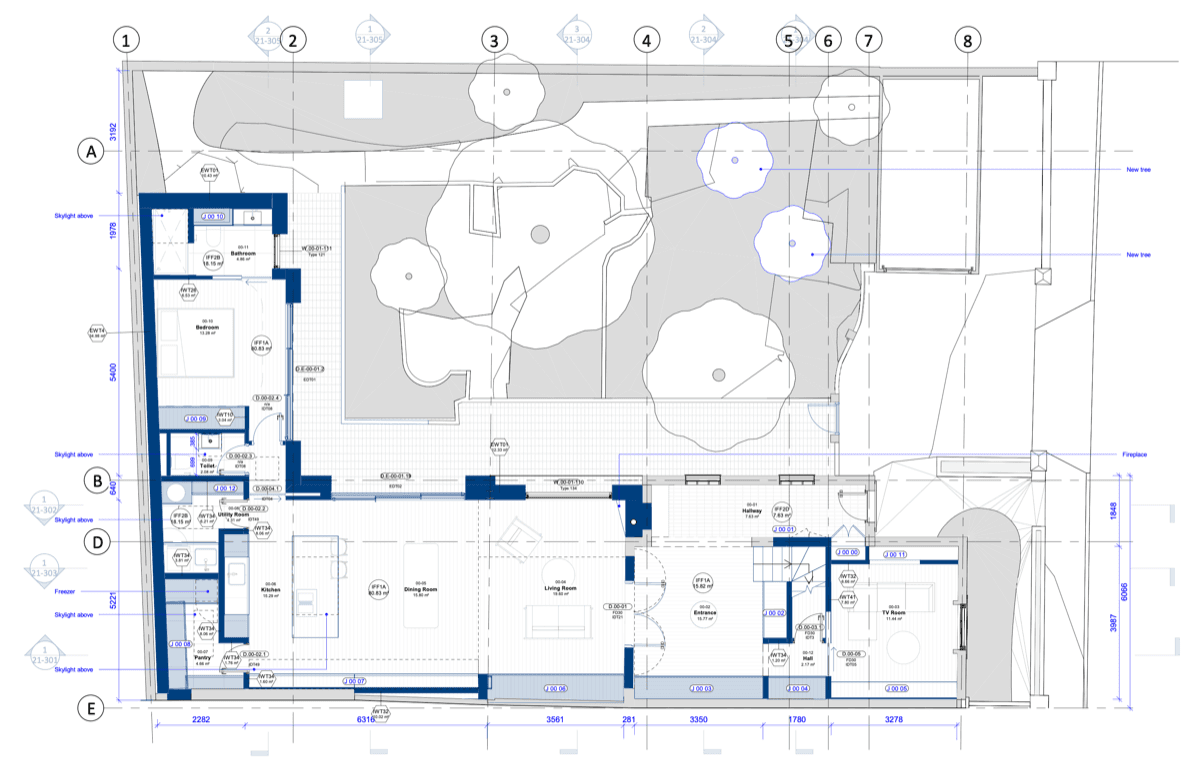
Xtimo classifies the pages, takes off the quantities, and prices every line, then flags the few that need your eye.
The estimating bottleneck
Tender responses take days
Take off, pricing and checking use up hours, often with no reward.
Every file is different
Architect SoWs arrive in their own layout, wording and column order. No two spreadsheets behave the same way, so manual parsing never ends.
Take-off is slow and manual
Measuring quantities off drawings by hand is the longest part of an estimate, and the easiest place for a small slip to become a large number.
Rates drift out of date
Pricing from memory or stale libraries leaves gaps you only notice when the margin disappears on site.
Errors hide until it hurts
A transposed quantity or missed item can sit quietly in a tender until it costs you the job, or costs you the profit.
How it works
Three steps to a review-ready estimate
Drop in what you have and let Xtimo do the heavy work, then review and export. You stay in control of every number.
Upload
Add your blueprint PDFs only; add an SoW if you have it; or describe the project in plain language. Xtimo creates your estimate from all types of input.
Estimate
Xtimo runs the project automatically: parses the files, takes off quantities, prices every line, then checks its own work.
Review and export
Obtain a fully priced SoW, where each line has a clear confidence score. Adjust the numbers, review the flagged items, and export to a clean Excel or PDF file.
Built for your role
One platform, four ways to win back time
Add drawings, an SoW or a few lines of plain language; Xtimo takes it from there and creates a priced, easy to review estimate.
Architects and designers
Hand over drawings, get a priced SoW back
Ask Xtimo to estimate your drawings during the design. Start the conversation on budget before the important decisions are made.
Explore the use caseDrawing analysis
12 rooms, 34 walls detectedQuantity surveyors
Review the flagged lines, skip the typing
Skip the manual parsing and first-pass take-off. Xtimo scores every quantity and surfaces the doubtful ones, so your judgement goes where it actually counts.
Explore the use caseSchedule of Work
Ready for reviewContractors
Price more tenders, protect the margin
Turn a tender pack into priced numbers fast, with anomalies surfaced before you commit. Chase more work without adding estimators to the bench.
Explore the use caseCost breakdown
For property developers & investors
Check the build cost before you buy
Appraise a site before you commit. Xtimo turns drawings or a description into a priced Schedule of Work, so you can test the margin before you purchase.
Explore the use caseSchedule of Work
Ready for reviewWhat's inside
Everything an estimate needs
A connected toolchain that reads your inputs, measures, prices, checks its own work and answers your questions.
SoW extraction
Reads architect Excel SoWs in whatever format they arrive, detects the columns and pulls out clean work items.
Blueprint analysis
Classifies PDF pages, detects room, wall, door and window patterns, then runs a two-pass take-off across the set.
Automatic run
Upload and walk away. Xtimo parses, takes off, prices and verifies, then reports progress live until the estimate is ready.
Quantity engine
A layered engine resolves each quantity through several methods, scores its confidence and flags the ones a human should confirm.
HAWK pricing
Grounds every rate in a real price library rather than guesswork, so the numbers reflect what work actually costs.
AI Assistant
An in-product AI assistant that answers questions about the estimate and drafts or edits the SoW on request.
Verification & audit
A checking pass that hunts for anomalies and spec risks, surfacing what looks off before it reaches a client.
Export
Send the finished estimate to Excel or PDF, formatted and ready to share, tender or file.
Every project sharpens your prices
Each estimate feeds your private price library. When you win or lose a tender, Xtimo learns the rates that actually clear the market, yours, not a generic book. The more you use it, the more it prices the way you win.
Learns from won and lost tenders
Every result feeds your library with rates that actually clear the market.
Your library, your rates, isolated
Scoped to your workspace, so your pricing edge compounds for you alone.
Sharper with every project
The more you run, the more grounded and confident each estimate gets.
Your price library
Isolated to your workspaceMore tenders in, sharper and more grounded prices out.
AI Assistant
Talk to your estimate
The AI assistant lives inside the workspace and knows your project. Ask why a line is priced the way it is, request a missing section, or have it redraft items in plain language. It drafts and edits real entries you approve before they stick.
Ask anything
Question any quantity, rate or assumption and get an answer grounded in your own project data.
Draft and edit
Add items, restructure sections or rework wording, with every change yours to confirm or reject.
Stay in context
It works from the actual SoW, drawings and prices in front of you, not a generic template.
Which quantities look unusually high?
Three lines sit above pattern: underpinning, structural steel and roof tiling. Each is flagged for review with its source.
Trust by design
Confident where it can be, honest where it can’t
Construction inputs are unpredictable, so Xtimo never hinges a number on a single guess. It reads each file in layers, scores its confidence on every quantity, and flags the doubtful lines for a human to confirm.
Confidence on every quantity
Each measured quantity carries a score, so you see which numbers are solid and which need a look.
Flagged for review, never buried
The hard cases are surfaced, not hidden. Xtimo asks rather than fabricating a tidy but wrong answer.
Human in the loop
Nothing is final until you say so. You confirm the flagged items and own the numbers that leave the building.
Quantity confidence
What our clients say
Early teams are already moving faster
“Xtimo turned a full set of drawings into a priced Schedule of Work in a fraction of the time it used to take us. Every line comes back with a confidence score and the ones worth a second look are flagged, so we can put a real number in front of a client far earlier than before.”
Pay only for what you estimate
A typical tender (SoW analysis, blueprint extraction, quantities, pricing, and audit) runs roughly 10 to 60 credits depending on tender size. No seats, no contracts.
Starter
For solo estimators and a few tenders a month
- 75 credits of AI compute / month
- Full SoW + blueprint analysis
- Spec risk analysis
- Excel + PDF export
Pro
Built for small and growing firms
- 180 credits of AI compute
- Full SoW + blueprint analysis
- Spec risk analysis
- Excel + PDF export
- Market rate benchmarks
- Team workspace (up to 5 users)
High Volume
Most popular for QS and bigger contractors
- 800 credits of AI compute
- Full SoW + blueprint analysis
- Spec risk analysis
- Excel + PDF export
- Market rate benchmarks
- Team workspace (unlimited users)
- SSO + advanced roles
- Dedicated success manager
Top up any time. Unused credits roll over.
Turn drawings into a priced SoW
Start the 14-day trial with 75 free credits. A card is required, you are not charged until day 15, and you can cancel anytime before then.